Become a Super Learner

Welcome to our Academy 2.0.

Join a fully professional, social, engaging, and interactive online school. Get the learning experience you deserve. 
Write your awesome label here.
Start today

Learn New Skills And Succeed!

Boost your confidence, master the field, become a certified professional.
  • Join the FREE Members' Club:
  • New ideas and practices shared
  • For New and Experienced Coaches:
  • Four levels of training
  • Highly Engaging courses:
  • Smart eLearning platform
  • Community Interactions for fun:
  • Accountability buddies and open discussions
Write your awesome label here.
Start today

Learn New Skills And Succeed!

Boost your confidence, master the field, become a certified professional.
  • Join the FREE Members' Club:
  • New ideas and practices shared
  • For New and Experienced Coaches:
  • Four levels of training
  • Highly Engaging courses:
  • Smart eLearning platform
  • Community Interactions for fun:
  • Accountability buddies and open discussions

The Ultimate User Experience

This guide covers your journey as a learner step by step,  from account creation to course access, dashboards, community tools, and troubleshooting,  so you can enjoy a seamless and engaging experience.
Write your awesome label here.
Empty space, drag to resize

User account: How to join the Academy

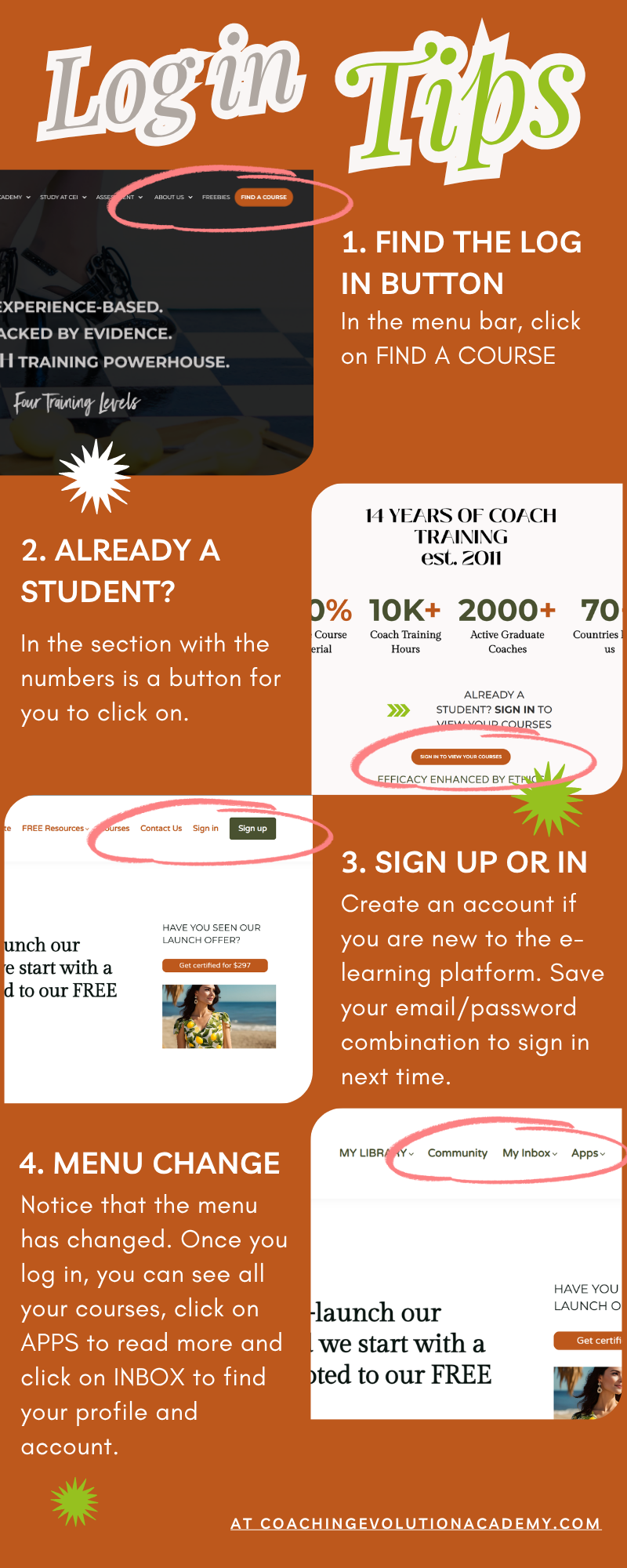
You must create an account before accessing your content. You can do this from the menu bar clicking on: Sign Up. Save the email and password you used to create the account as you will need them every time you sign in to access your content (learning material).

Enrollments: Getting access to a course

You must enroll yourself directly from the product page. Once you go to the course page (CEI Library of Courses), you click on the course that interests you or is suitable for your level of coaching/training and  you purchase it if it is a paid course. You simply enroll if it is free.

The majority of courses have a start date (cohort based), so check the FAQs to see the dates the live classes are held on.
Write your awesome label here.
Empty space, drag to resize

Academy emails & notifications

We make sure to keep you engaged and informed with automated emails triggered by specific events. For example:
  • Welcome Email: Sent upon account creation.
  • Enrollment Email: Sent upon enrollment in a course.
  • When email verification is required: Sent upon signup with a verification message. Please make sure you look for this email!
  • On purchase: Sent when a new purchase is completed.
  • Message notification: Sent with a notification when you are sent a message in the Community.
  • Mention notification: Sent when you are mentioned in a post/comment.
  • Invite notification: Sent when you are invited to a space.
  • On completion: Sent when you complete a course or program.
  • Installment Paid: Sent when an Installment is paid.
  • Installment Payment Failed: Sent when an installment payment has failed.
  • Payment Plan Completed: Sent when a payment plan is completed.

Home page vs. After login page

The Academy uses two key landing pages:
Page Type: Home Page (Free Resources Page)
What It Does: Public homepage: what you see before signing up/signing in.
Page Type: After Login Page
What It Does: The first page you see after logging into your account.
To see the Home page again you can click on the FREE Resources in the menu. To see the initial menu bar, you need to log out. When you log out you are taken to the main website.
Write your awesome label here.
Empty space, drag to resize

Profile page: Your personal space

Each learner in the Academy has access to a Profile page, where you can view your learning activity and achievements.
The Profile can include information about:
  • Enrolled courses,time spent, posts, and achievements
  • Downloadable certificates, badges (if gamification is enabled), and purchased products
  • Followers and following (from the People Directory) 

Account page: Manage subscriptions & settings

The Account Page is your hub for managing subscriptions, billing, payments, and profile settings, all in one place. 

You can:
  • Update personal info and password
  • View enrolled courses and programs
  • Manage subscriptions and payment methods
  • Review payment history and download invoices
  • Adjust notification and privacy settings
Write your awesome label here.
Empty space, drag to resize

Course player: Accessing content

The Course Player delivers our educational content in an intuitive, branded interface. You access it automatically when you start a course or learning program - the contents will not be there from a start especially if the cohort has specific dates for live classes.
The Course Player supports videos, study files, quizzes, assessments, and more.
It supports instant access upon enrollment (unless using drip-feed scheduling where you will see specific dates).

Community & communication tools

We foster interaction between you and staff with these options:

The Tool

Community Spaces

What is offers

Allows you to post, comment, and engage with classmates or staff on specific topics.
Course Discussions
Enables Q&A and topic discussions directly within each course. This is one of the best tools to share ideas or comments on material.
Inbox Messaging
You can send private messages to staff or classmates.
Write your awesome label here.
Empty space, drag to resize

Your troubleshooting guide

When you reports a tech issue, please follow these recommended steps before escalating:
1. Clear your cache and restart your browser.
2. Try from a different browser or using incognito. 
3. Check for any add-ons that might be blocking some actions.
4. Restart your device or try another one if possible (if there is a second device in the household).

If the issue persists, please contact us via a community message or via email.

Healthy Eating

Discover how to eat a healthy diet that includes vegetables, fruits, protein, grains, and dairy products.

Water, Hydration & Health

Find out what foods and beverages can help you stay hydrated, and how much water you should drink each day.

Eating Vegetarian

Create a vegetarian eating plan that meets nutrient recommendations with these tips and resources.
About Us

Meet our team

Our vision is to create a better everyday life for many people and bring inspiration and innovation to everyone.

Featured teacher
“Online learning and training have become an essential part of our society. LearnWorlds is one of the top platforms to create and sell online courses.”

Jane Moore

Product Manager
Study with us

Do You Want
To Study with us?

We make education accessible for students from all over the world. Our doors are open to the students of all ages and any levels of experience. Our mission is to develop individuals, inspire creative passion, and increase students' self-confidence.

Your Stories

#e-learning| #education | #online courses |

"The school has everything that I need for successful study: textbooks, daily assignments, planner, notebooks, music sheets, a staff who are very skilled and experienced, and ready to help at any time."

Sara Parker

"I am most grateful that my son's teacher not only makes learning fun and shares his knowledge, but his passion for studying as well. I could not have found a better place for him to learn."

Josh Stobbard

“I received my certificate, and I would like to thank you for your continuous support. The courses were challenging, but my instructors were always there supporting me and ready to help."

Ann Cooper

Write your awesome label here.
Never miss our news

Check out more goodies

Receive our news directly to your inbox. Don’t worry, your information is secret safe with us!
Created with